Hidden Numbers PRO
LittleBigPlay - Word, Educational & Puzzle GamesTrivia
4.310.00 Reviews
- Version
- Varies With Device
- Installs
- 10.00K
- Age Rating
- Everyone
Screenshots
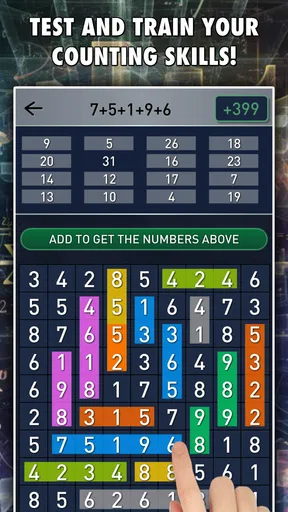
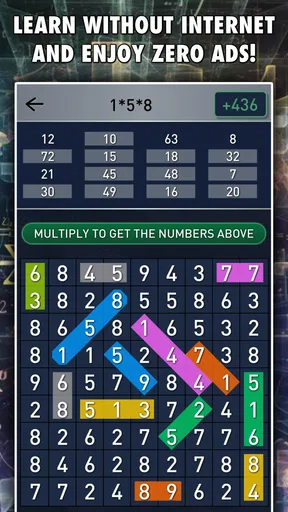
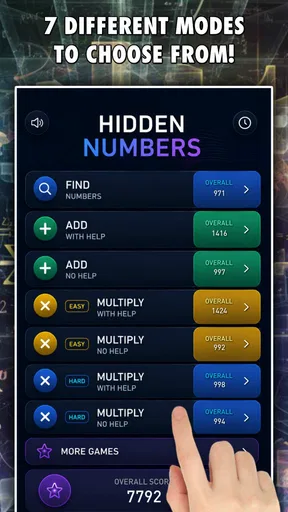
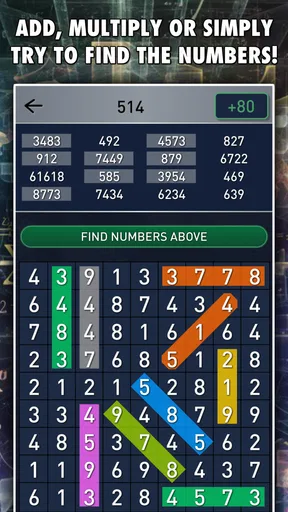
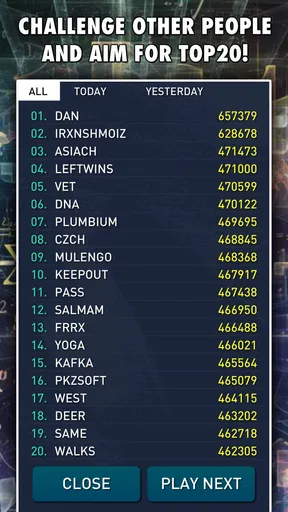
Our Review of Hidden Numbers PRO
 Analysis by Appyee
Some trivia games are built for long sessions, while Hidden Numbers PRO is much easier to understand as a quick mental workout. I found its appeal in the simple challenge of working with numbers while a clock is running, then switching to a calmer pace when I wanted to think more carefully. It is a paid Android game in the trivia category from LittleBigPlay - Word, Educational & Puzzle Games, and its focus is clearly on combining basic mathematics with competition and repetition.
The first thing worth knowing is that this is not a full mathematics course or a story-driven puzzle adventure. It is better suited to short practice sessions, casual challenges, and anyone who enjoys testing accuracy under pressure. The game offers timed and untimed ways to play, with difficulty ranging from easy to hard, so I could choose between speed and concentration instead of being forced into one style every time.
Where the experience can become confusing
The biggest source of friction is not necessarily the arithmetic itself. It is understanding which mode matches the kind of practice I want. A timed round encourages quick recognition and fast decisions, but an untimed round is more useful when I am trying to understand a mistake or rebuild confidence. Treating every mode as a speed test makes the game feel harsher than it needs to be.
I would begin with the easiest untimed option, especially if I had not played a number-focused game recently. That gives me a chance to settle into the question format and notice how answers are presented. After that, I would move to a timed mode and use the result as a guide rather than as a judgment. A poor first attempt can simply mean that I was still adjusting to the interface or rushing unnecessarily.
The range of seven timed and untimed modes gives the game more variety than a single repeating quiz, but it also means that the best route is not obvious for every player. Someone looking for fast competition may naturally prefer the timed choices. A child, a learner, or an adult returning to mental arithmetic may get more value from beginning slowly and increasing the pressure only after the basic rhythm feels comfortable.
Another possible sticking point is the difference between knowing an answer and entering it quickly. In a timed setting, hesitation can come from reading the question, deciding on the calculation, or interacting with the controls. Those are separate skills. If I wanted to improve, I would pay attention to which part caused the delay instead of assuming that the arithmetic was the only problem.
This distinction matters in everyday use. Imagine waiting for a bus with a few spare minutes. An untimed round can provide a relaxed distraction. On another day, I might use a timed mode before a study session as a brief warm-up. The same game serves both situations, but only if I choose the mode intentionally rather than tapping through the menu without a plan.
What to check before blaming the game
Because the game is designed for Android and supports an older minimum operating-system requirement of 2.3, installation should be straightforward on many compatible devices. Even so, I would first check that the device has enough free storage and that the installation has completed properly. A partially completed installation or a device under heavy storage pressure can create problems that look like game errors.
The price is $0.49, so this is not a free trial decision in the usual sense. I would make sure I am signed into the intended store account before purchasing, particularly on a shared device. That small check avoids confusion later if more than one account is available on the phone or tablet.
After installing, I would open the game once before planning a serious session. This simple step confirms that it starts correctly, that the display is readable, and that the controls respond as expected. If the game opens but the screen behaves strangely, rotating the device back to its normal orientation and restarting the app are sensible first checks. I would also close other demanding apps if the device is old or already running slowly.
The age rating is Everyone, which makes the game suitable for a broad audience from a content perspective. That does not mean every difficulty level will be equally comfortable for every player. A young learner may need help choosing a starting mode, while an adult may prefer the harder challenges immediately. The rating describes accessibility of content, not a guarantee that every question will feel effortless.
It is also useful to separate installation questions from gameplay questions. If the game installs and opens, but a particular round feels difficult, that is probably a matter of selecting another mode or slowing down. Reinstalling will not improve arithmetic confidence. Conversely, if the app closes before a round begins, restarting the device and checking available space are more appropriate than repeatedly changing game settings.
Since the game was released on July 29, 2018, I would keep expectations realistic about presentation. Its value is in the number challenges and the choice between pressure and patience, not in expecting the visual polish or platform behavior of a newly designed mobile release. That is not automatically a flaw, but it helps explain why a player who wants elaborate animation or a modern social layer may prefer another trivia game.
A setup routine that reduces wasted time
My preferred first-session routine would be short and deliberate. I would install the game, launch it while connected to the store account used for the purchase, and try an untimed mode. I would then test a timed mode only after confirming that the text and input controls are comfortable. This approach makes it easier to identify whether a problem comes from the device, the interface, or the chosen level of pressure.
I would avoid beginning with the hardest available challenge simply to see whether I could survive it. That creates a poor baseline. A better test is to complete one relaxed round, note whether the questions are understandable, and then try a faster mode. If both work, the setup is probably fine and the remaining challenge is simply the intended gameplay.
For a family device, I would also give each player a moment to adjust the pace. One person may enjoy the clock, while another may find the same format stressful. The untimed options are important here because they let the game function as a shared learning activity rather than only as a contest. I would use the timed modes for friendly competition and the untimed ones for explaining calculations.
Players should also remember that a small screen can change the experience. On a phone, reading and entering answers may feel more cramped than on a larger device. If the interface feels difficult to use, holding the device steadily, increasing general system text size where appropriate, or switching to a larger compatible screen may help. These are practical comfort adjustments, not changes to the game itself.
Recovering a session when something goes wrong
If a round becomes unresponsive, my first step would be to pause the session mentally rather than tapping repeatedly. I would leave the game, close it normally if possible, and reopen it. If the issue remains, restarting the device is a reasonable next move. These basic actions often clear temporary problems without risking unnecessary changes to the installation.
I would be cautious about clearing app data or uninstalling immediately. For a small trivia game, those steps may remove local progress or settings, depending on how the device handles the app. They should be treated as later troubleshooting options, not as the first response to a single frozen screen. Reinstalling is especially unhelpful if the real issue is low storage, an unstable device, or an interrupted system process.
When a timed round ends unexpectedly, I would first decide whether the problem repeats. One isolated interruption may be a temporary device issue. If every attempt fails at the same point, I would record the mode I selected and what happened, then contact the app’s support channel through the relevant store or developer listing. Describing the exact sequence is more useful than simply saying that the game does not work.
There is also a useful recovery method for ordinary mistakes. If I answer incorrectly or run out of time, I would not immediately repeat the same mode at the same difficulty. I would switch to an untimed option, work through a few questions carefully, and then return to the timed challenge. This creates a practical bridge between learning and performance: first understand the calculation, then train the speed.
That workflow is one of the game’s strongest practical qualities. Many quick quizzes reward only instant recall, while a number game can expose whether the difficulty comes from calculation, attention, or time pressure. By changing modes instead of abandoning the session, I can turn a disappointing result into targeted practice.
When the app is not the cause
It is easy to blame the game when a device is slow, but older hardware, crowded storage, and too many background processes can affect any app. If other applications are also lagging, the sensible response is to address the device first. Closing unused apps and freeing space may improve the whole phone rather than only this game.
Display problems can also be misleading. If text appears unusually large, clipped, or difficult to read, system display settings or accessibility features may be involved. I would compare the game with another app before deciding that the trivia game is responsible. A device-wide issue needs a device-wide adjustment.
Input errors deserve the same care. If taps are missed in several applications, the touchscreen or protective screen may be the real cause. If the problem appears only during a fast round, I would consider whether I am rushing or holding the phone awkwardly. Timed play magnifies small interaction problems, so it can reveal a weakness in the setup without creating it.
Connectivity is another area where expectations should be sensible. The core appeal is the act of answering number questions, and the presence of untimed play makes it suitable for moments when I do not want to depend on a live competitive environment. Still, store-account or installation issues can involve the device or platform rather than the game. I would distinguish trouble downloading or purchasing from trouble completing a round.
These checks are especially important because the game is small in scope. It is not trying to replace a calculator, a structured educational curriculum, or a large online trivia service. If I need detailed explanations, formal lessons, progress reporting, or broad general-knowledge categories, I would choose a dedicated learning tool instead. If I want a compact number challenge, those missing ambitions are less relevant.
How it compares with familiar alternatives
Compared with general trivia apps, this game is narrower but more focused. A broad quiz can offer questions about history, entertainment, science, and geography, which is better for variety and conversation. Hidden Numbers PRO keeps attention on numbers, so it is the more sensible choice when I want mental arithmetic practice rather than a test of stored facts.
Compared with a calculator, it offers the opposite experience. A calculator gives me certainty and speed after entering the problem, while this game asks me to perform the thinking myself. That makes it useful for training attention, but frustrating if my only goal is to verify an answer. I would use a calculator for accuracy in real work and this game for practice or play.
Compared with flashcards or educational worksheets, the timed modes add urgency and replay value. Worksheets are better when I need to see a full method and write out steps. The game is better when I want a lightweight challenge that fits into a short break. The untimed modes narrow that gap somewhat, but they do not turn the app into a complete teaching system.
Compared with newer competitive games, its modest presentation may feel dated. On the other hand, the limited focus can be refreshing. There are fewer distractions between me and the question, and the choice of seven modes gives me a practical way to adjust the session. The trade-off is clear: choose this for focused number play, not for a large ecosystem of social features or constantly changing content.
Who will get the most from it
I think the best audience includes casual players who enjoy quick challenges, learners who want extra arithmetic practice, and adults who like keeping mental calculation active. It can also work for a parent and child who want to compare careful untimed solving with faster timed attempts. The Everyone rating supports that broad audience, while the easy-to-hard range lets different skill levels begin in different places.
The game is particularly useful when the goal is specific. I would recommend it to someone who says, “I want to practise numbers for a few minutes,” rather than to someone asking for a complete educational plan. Its compact format makes it easy to fit between errands, during a break, or before studying. The paid price of $0.49 is also modest, but I would still judge the purchase by whether this focused type of play matches my habits.
I would skip it if I dislike timed questions, need detailed explanations after every answer, or want a wide range of trivia subjects. I would also look elsewhere if polished visuals, multiplayer interaction, or a deep long-term progression system are essential. Those are not small preferences; they change the kind of app I should choose.
My practical verdict after using its different modes
With an average rating of 4.3 from around 195 ratings and more than 10K installs, the game has found a modest audience rather than presenting itself as a massive mainstream title. Those figures suggest that people who discover its focused format can appreciate it, but they do not remove the need to decide whether number-based trivia is personally appealing.
My recommendation is to approach it as a compact mental workout. Start untimed, use the easier level to learn the rhythm, and move into timed play only when the controls and question style feel natural. If a session goes badly, change the pace before changing the app. That simple workflow makes the game more useful and prevents speed from hiding what I actually need to practise.
Hidden Numbers PRO is worth choosing when you want focused arithmetic play in short sessions. It is not the right replacement for a calculator, a full learning platform, or a broad trivia collection, and its older release means I would keep expectations grounded. Within its narrow purpose, though, the combination of timed pressure, untimed practice, and several difficulty choices gives it a clear reason to exist. For me, that makes it a small but practical game for turning spare minutes into deliberate number practice.
Verdict
Strengths of Hidden Numbers PRO
- Trains visual attention by making users scan detailed images for hidden numbers.
- Short levels make it convenient for quick breaks or casual play sessions.
- Simple tap-to-find controls are easy for players of different ages to understand.
- Progression encourages replaying levels to improve speed and accuracy.
- Works well as a quiet, low-pressure alternative to action-focused puzzle games.
Limitations of Hidden Numbers PRO
- Small numbers can be difficult to see, especially on phones with compact screens.
- Some levels may feel repetitive after extended play sessions.
- Players who prefer fast-paced gameplay may find the experience too slow.
- Visual difficulty can vary noticeably between levels.
- The PRO version may offer limited value for users seeking frequent new content.
Other Releases by LittleBigPlay - Word, Educational & Puzzle Games
View All


Similar Picks in This Category
View All
Millionaire 2026 Quiz & Trivia
Quiz & Trivia Games by Submarine Apps4.5

Brain Test 2: Tricky Stories
Unico Studio4.7

Trivia Crack: Brain Quiz Games
etermax4.4

QuizzLand. Quiz & Trivia game
Quiz & Trivia Games by Mno Go Apps4.8

Brain Test: Tricky Puzzles
Unico Studio4.7

Logo Quiz
bubble quiz games4.5
Frequently Asked Questions
What is Hidden Numbers PRO and how does the game work?
Hidden Numbers PRO is a visual puzzle game in which you search for concealed numbers within detailed images or scenes. Each level challenges you to observe shapes, colors, and backgrounds carefully while locating every required number. The game is designed for casual play, but later stages can become increasingly difficult and may require patience, concentration, and a methodical approach.
Is Hidden Numbers PRO suitable for children and beginners?
The game is generally easy to understand because its main objective is simply to find hidden numbers, making it accessible to beginners and younger players. However, the difficulty of some scenes may frustrate children who are not used to observation puzzles. Parents should also review the app’s age rating, advertising, and any in-app purchase information before allowing a child to play.
Does Hidden Numbers PRO work without an internet connection?
Hidden Numbers PRO may be playable offline once its necessary content has been installed, which makes it convenient for travel, waiting rooms, or areas with limited connectivity. Nevertheless, certain features—such as advertisements, updates, analytics, cloud synchronization, or purchases—could require internet access. It is best to launch the game online first and test the main levels before relying on it offline.
Are there hints, timers, or additional costs in Hidden Numbers PRO?
Depending on the version and platform, Hidden Numbers PRO can include helpful tools such as hints, level progression systems, or optional time-based challenges. Some assistance may be limited or connected to advertisements, while other content could involve in-app purchases. Before downloading, check the store listing for current pricing, advertising details, and purchase requirements, since these can change with updates.
What should I check before downloading Hidden Numbers PRO?
Before installing Hidden Numbers PRO, check that your Android or iOS device meets the listed operating-system requirements and has enough free storage for the application and future updates. You should also review recent user feedback, permissions, privacy information, advertisements, and whether your preferred language is supported. If you dislike repetitive puzzle scenes, confirm that the available level variety matches your expectations.
Play our best games!


